A
ai.smithery/mfukushim-map-traveler-mcp
@mfukushim/map-traveler-mcp
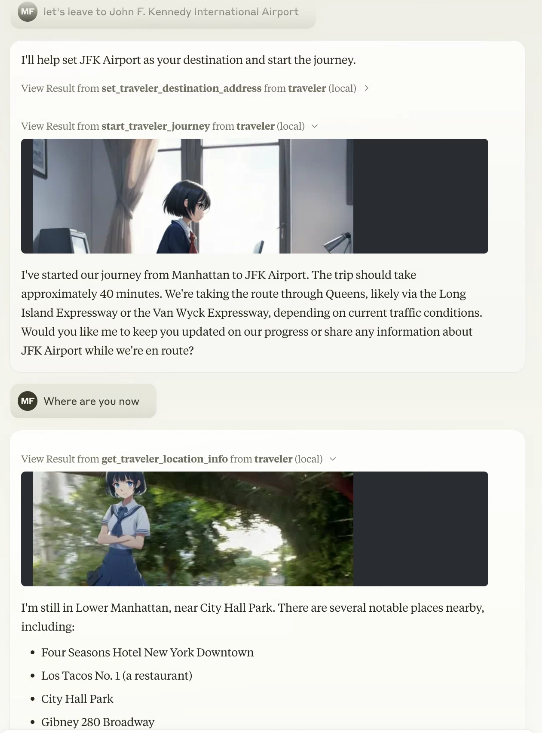
Create immersive travel experiences by instructing an avatar to navigate Google Maps. Report on th…
No known CVEs
No license
Stale
Last commit 183d ago
Works with most clients
Transport: stdio, sse, http
0 tools
Grade F
Step 1
Install in your client
Config is the same across clients — only the file and path differ.
CD
Supported in Claude Desktopstdio, sse, http · Node 18+
Paste into ~/Library/Application Support/Claude/claude_desktop_config.json
{
  "mcpServers": {
    "traveler": {
      "env": {
        "MT_BS_ID": "(Bluesky sns registration address)",
        "MT_SD_KEY": "(or Stability.ai image generation API key",
        "MT_BS_PASS": "(bluesky sns password)",
        "MT_FEED_TAG": "(Optional: Specify the feed tag when posting to SNS (#required, 15 characters or more) Default is #geo_less_traveler)",
        "MT_NO_IMAGE": "(Options: true = do not output image, not specified = output image if possible, default is not specified)",
        "MT_BS_HANDLE": "(bluesky sns handle name: e.g. xxxxxxxx.bsky.social )",
        "MT_COMFY_URL": "(Option: Generate image using ComfyUI API at specified URL. Example: http://192.168.1.100:8188)",
        "MT_MOVE_MODE": "(Option: Specify whether the movement mode is realtime or skip. default realtime)",
        "MT_NO_AVATAR": "(Option: true = Output StreetView image as is without avatar superimposition. Not specified = Superimpose avatar image. Default is not specified.)",
        "MT_PIXAI_KEY": "(pixAi API key)",
        "MT_REMBG_URL": "(rembg API URL)",
        "MT_TURSO_URL": "(Turso sqlite API URL)",
        "MT_REMBG_PATH": "(absolute path of the installed rembg cli)",
        "MT_TIME_SCALE": "(Optional:Scale of travel time on real roads duration. default 4)",
        "MT_IMAGE_WIDTH": "(Option: Output image width (pixels) Default is 512)",
        "MT_MAP_API_URL": "(Optional: Map API custom endpoint. Example: direction=https://xxxx,places=https://yyyy )",
        "MT_SQLITE_PATH": "(db save path: e.g. %USERPROFILE%/Desktop/traveler.sqlite ,$HOME/traveler.sqlite )",
        "MT_TURSO_TOKEN": "(Turso sqlite API access token)",
        "MT_COMFY_PARAMS": "(Optional: Variable values to send to the workflow via comfyUI API)",
        "MT_FILTER_TOOLS": "(Optional: Directly filter the tools to be used. All are available if not specified. e.g. tips,set_traveler_location)",
        "MT_MAX_SESSIONS": "(Maximum number of sessions when using Streamable-http)",
        "MT_REMBG_WO_KEY": "(withoutbg.com rembg API key)",
        "MT_BODY_HW_RATIO": "(Optional: Acceptable avatar image aspect ratios. default 1.5~2.3)",
        "MT_GOOGLE_MAP_KEY": "(Google Map API key)",
        "MT_PIXAI_MODEL_ID": "(Optional: pixAi ModelId, if not set use default model 1648918127446573124 ",
        "MT_SERVICE_TTL_MS": "(Service TTL when using Streamable-http)",
        "MT_SESSION_TTL_MS": "(Session TTL when using Streamable-http)",
        "MT_BODY_AREA_RATIO": "(Optional: Acceptable avatar image area ratio. default 0.042)",
        "MT_AVATAR_IMAGE_URI": "(Character reference image uri (file:// or https://) when generating Gemini image. Multiple settings can be made by separating them with the '|'. When multiple settings are made, they will be selected randomly.)",
        "MT_GEMINI_IMAGE_KEY": "(Gemini Image Api key)",
        "MT_MAX_RETRY_GEMINI": "(Number of retries when generating Gemini images Default: 0)",
        "MT_COMFY_WORKFLOW_I2I": "(Optional: Path of API workflow file when image to image in ComfyUI. If not specified: assets/comfy/i2i_sample.json)",
        "MT_COMFY_WORKFLOW_T2I": "(Optional: Path to API workflow file when using text to image with ComfyUI. If not specified: assets/comfy/t2i_sample.json)",
        "MT_FIXED_MODEL_PROMPT": "(Optional: Fixed avatar generation prompt. You will no longer be able to change your avatar during conversations.)",
        "MT_BODY_WINDOW_RATIO_H": "(Optional: Avatar composite window aspect ratio. default 0.75)",
        "MT_BODY_WINDOW_RATIO_W": "(Optional: Avatar composite window horizontal ratio. default 0.5)"
      },
      "args": [
        "-y",
        "@mfukushim/map-traveler-mcp"
      ],
      "command": "npx"
    }
  }
}
Are you the author?
Add this badge to your README to show your security score and help users find safe servers.
Embed in your READMEAbout badges →
[](https://mcppedia.org/s/ai-smithery-mfukushim-map-traveler-mcp)
Read me
What ai.smithery/mfukushim-map-traveler-mcp does
This is an MCP server that creates an environment for an avatar to virtually travel on Google Maps.
Test This Server
Run this in your terminal to verify the server starts. Then let us know if it worked — your result helps other developers.
npx -y '@mfukushim/map-traveler-mcp' 2>&1 | head -1 && echo "✓ Server started successfully"
After testing, let us know if it worked:
Loading README…
Scored, not listed
Why this score
Five weighted categories — click any category to see the underlying evidence.
Score breakdown
46/100across 5 weighted dimensions
0255075100
19
14
10
−54
Security
Maintenance
Efficiency
Documentation
Compatibility
Categoriesclick a row to see evidence
Security
OSV.devNo known CVEs.
Checked @mfukushim/map-traveler-mcp against OSV.dev.
Community
Reviews
Be the first to review
Have you used this server?
Share your experience — it helps other developers decide.
How easy was setup?Did it work reliably?How was the documentation?
Sign in to write a review.
Frequently Asked Questions
- Is ai.smithery/mfukushim-map-traveler-mcp safe to use?
- ai.smithery/mfukushim-map-traveler-mcp has no known CVEs as of the latest MCPpedia security scan. It does not require authentication, so any local process can connect — keep this in mind in shared environments.
- How do I install ai.smithery/mfukushim-map-traveler-mcp?
- ai.smithery/mfukushim-map-traveler-mcp supports copy-paste install configs on its MCPpedia page for Claude Desktop, Cursor, and Claude Code. Scroll to the Quick Install section and select your client.
- What AI clients work with ai.smithery/mfukushim-map-traveler-mcp?
- ai.smithery/mfukushim-map-traveler-mcp is compatible with claude-desktop, cursor, claude-code. It uses stdio and sse and http transport.
- Is ai.smithery/mfukushim-map-traveler-mcp actively maintained?
- ai.smithery/mfukushim-map-traveler-mcp is less actively maintained — last commit was 183 days ago. It has 23 GitHub stars.
Related
Similar servers
Others in maps
 Tomtom Mcp90
A Model Context Protocol (MCP) server providing TomTom's location services, search, routing, and traffic data to AI agents.
46 1
I
io.github.srivastsh/bart-mcp90Real-time BART departures, trip planning, fares, stations, and advisories.
12
I
io.github.vessel-api/vesselapi-mcp88MCP server for the VesselAPI — maritime vessel tracking, port events, emissions, and navigation data
23
D
dev.forgesworn/rendezvous-mcp87Fair meeting point discovery for AI agents with isochrone-based travel time fairness
5
MCP Security Weekly
Get CVE alerts and security updates for ai.smithery/mfukushim-map-traveler-mcp and similar servers.
Community
Discussion
Start a conversation
Ask a question, share a tip, or report an issue.
Has anyone used this with Cursor?How do you handle auth?Any alternatives?
Sign in to join the discussion.