Claude Skill For Multimodal Report Generation
mcp · by umairalipathan1980
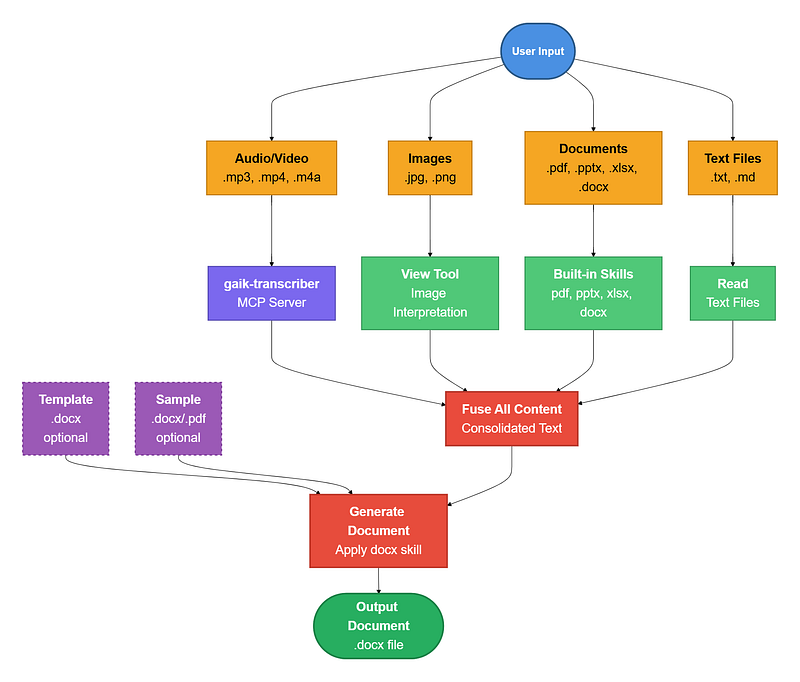
A Claude Skill that converts mixed-format files (documents, images, audio/video) into structured, template-based reports using a custom MCP server.
No known CVEs
No license
Maintained
Last commit 106d ago
Works with most clients
Transport: stdio
0 tools
Grade F
Step 1
Install in your client
Config is the same across clients — only the file and path differ.
CD
Supported in Claude Desktopstdio · Node 18+
Paste into ~/Library/Application Support/Claude/claude_desktop_config.json
{
  "mcpServers": {
    "claude-skill-for-multimodal-report-generation": {
      "args": [
        "mcp"
      ],
      "command": "uvx"
    }
  }
}
Are you the author?
Add this badge to your README to show your security score and help users find safe servers.
Embed in your READMEAbout badges →
[](https://mcppedia.org/s/claude-skill-for-multimodal-report-generation)
Read me
What Claude Skill For Multimodal Report Generation does
A Claude Code skill and MCP server for converting scattered meeting materials into structured Word documents.
Test This Server
Run this in your terminal to verify the server starts. Then let us know if it worked — your result helps other developers.
uvx 'mcp' 2>&1 | head -1 && echo "✓ Server started successfully"
After testing, let us know if it worked:
Loading README…
Scored, not listed
Why this score
Five weighted categories — click any category to see the underlying evidence.
Score breakdown
48/100across 5 weighted dimensions
0255075100
19
14
10
−52
Security
Maintenance
Efficiency
Documentation
Compatibility
Categoriesclick a row to see evidence
Security
OSV.dev3 fixed
CVE-2025-66416medium · fixedCVSS 4
Model Context Protocol (MCP) Python SDK does not enable DNS rebinding protection by default
### Description The Model Context Protocol (MCP) Python SDK does not enable DNS rebinding protection by default for HTTP-based servers. When an HTTP-based MCP server is run on localhost without authentication using `FastMCP` with streamable HTTP or SSE transport, and has not configured `TransportSecuritySettings`, a malicious website could exploit DNS rebinding to bypass same-origin policy restrictions and send requests to the local MCP server. This could allow an attacker to invoke tools or ac
CVE-2025-53366medium · fixedCVSS 4
MCP Python SDK vulnerability in the FastMCP Server causes validation error, leading to DoS
A validation error in the MCP SDK can cause an unhandled exception when processing malformed requests, resulting in service unavailability (500 errors) until manually restarted. Impact may vary depending on the deployment conditions, and presence of infrastructure-level resilience measures. Thank you to Rich Harang for reporting this issue.
CVE-2025-53365medium · fixedCVSS 4
MCP Python SDK has Unhandled Exception in Streamable HTTP Transport, Leading to Denial of Service
If a client deliberately triggers an exception after establishing a streamable HTTP session, this can lead to an uncaught ClosedResourceError on the server side, causing the server to crash and requiring a restart to restore service. Impact may vary depending on the deployment conditions, and presence of infrastructure-level resilience measures. Thank you to Rich Harang for reporting this issue.
Community
Reviews
Be the first to review
Have you used this server?
Share your experience — it helps other developers decide.
How easy was setup?Did it work reliably?How was the documentation?
Sign in to write a review.
Frequently Asked Questions
- Is Claude Skill For Multimodal Report Generation safe to use?
- Claude Skill For Multimodal Report Generation has no known CVEs as of the latest MCPpedia security scan. It does not require authentication, so any local process can connect — keep this in mind in shared environments.
- How do I install Claude Skill For Multimodal Report Generation?
- Claude Skill For Multimodal Report Generation supports copy-paste install configs on its MCPpedia page for Claude Desktop, Cursor, and Claude Code. Scroll to the Quick Install section and select your client.
- What AI clients work with Claude Skill For Multimodal Report Generation?
- Claude Skill For Multimodal Report Generation is compatible with claude-desktop, cursor, claude-code. It uses stdio transport.
- Is Claude Skill For Multimodal Report Generation actively maintained?
- Claude Skill For Multimodal Report Generation is less actively maintained — last commit was 106 days ago. It has 38 GitHub stars.
Related
Similar servers
Others in writing
 Solomd95
A markdown editor — and the bridge to your LLM. Local-first, MIT, ~15 MB. Bundled MCP server lets Claude Code / Codex / Cursor drive your vault directly. 14 AI providers BYOK.
341 4
 Prompts.Chat94
f.k.a. Awesome ChatGPT Prompts. Share, discover, and collect prompts from the community. Free and open source — self-host for your organization with complete privacy.
163.0k 1
 Sub Agents Mcp93
Define task-specific AI sub-agents in Markdown for any MCP-compatible tool.
83 1
 Wechatsync92
一键同步文章到多个内容平台,支持今日头条、WordPress、知乎、简书、掘金、CSDN、typecho各大平台,一次发布,多平台同步发布。解放个人生产力
5.6k 5
MCP Security Weekly
Get CVE alerts and security updates for Claude Skill For Multimodal Report Generation and similar servers.
Community
Discussion
Start a conversation
Ask a question, share a tip, or report an issue.
Has anyone used this with Cursor?How do you handle auth?Any alternatives?
Sign in to join the discussion.