I
io.github.Defozo/ddc-ci-control-bridge
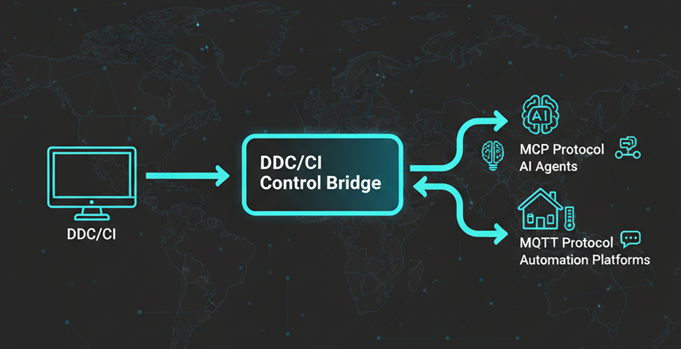
Control monitor brightness, contrast, power and input via DDC/CI with MCP and MQTT support.
MaintainedNot tested
★ 4GitHub
23DNo CVEsmaintained
Quick Install
{
  "mcpServers": {
    "io-github-defozo-ddc-ci-control-bridge": {
      "command": "<see-readme>",
      "args": []
    }
  }
}No install config available. Check the server's README for setup instructions.
Are you the author?
Add this badge to your README to show your security score and help users find safe servers.
Embed in your READMEAbout badges →
[](https://mcppedia.org/s/io-github-defozo-ddc-ci-control-bridge)
Should you use this server?
Control monitor brightness, contrast, power and input via DDC/CI with MCP and MQTT support.
✓
Is it safe?
No package registry to scan.
No authentication — any process on your machine can connect.
License not specified.
✓
Is it maintained?
Last commit 65 days ago. 4 stars.
i
Will it work with my client?
Transport: stdio. Works with Claude Desktop, Cursor, Claude Code, and most MCP clients.
Test This Server
No automated test available for this server. Check the GitHub README for setup instructions.
Score Breakdown
Security
3/30No known vulnerabilities.
○
Known CVEs — No package registry to scan
○
Tool safety — No tools to analyze
○
Tool poisoning — No tools to analyze
○
Injection vectors — No tools to analyze
✓
Tool stability — Tool definitions stable
○
Dependency health — No package to analyze
✗
License — No license specified
○
Authentication — No authentication required
○