I
io.github.hevangel/batch-review-mcp
Git diff and markdown review with a web UI plus MCP stdio for AI agents.
ActiveNot tested
★ 1GitHub
28DNo CVEsactive
Quick Install
{
  "mcpServers": {
    "io-github-hevangel-batch-review-mcp": {
      "command": "<see-readme>",
      "args": []
    }
  }
}No install config available. Check the server's README for setup instructions.
Are you the author?
Add this badge to your README to show your security score and help users find safe servers.
Embed in your READMEAbout badges →
[](https://mcppedia.org/s/io-github-hevangel-batch-review-mcp)
Should you use this server?
Git diff and markdown review with a web UI plus MCP stdio for AI agents.
✓
Is it safe?
No package registry to scan.
No authentication — any process on your machine can connect.
License not specified.
✓
Is it maintained?
Last commit 1 days ago. 1 stars.
i
Will it work with my client?
Transport: stdio. Works with Claude Desktop, Cursor, Claude Code, and most MCP clients.
README
Batch Review
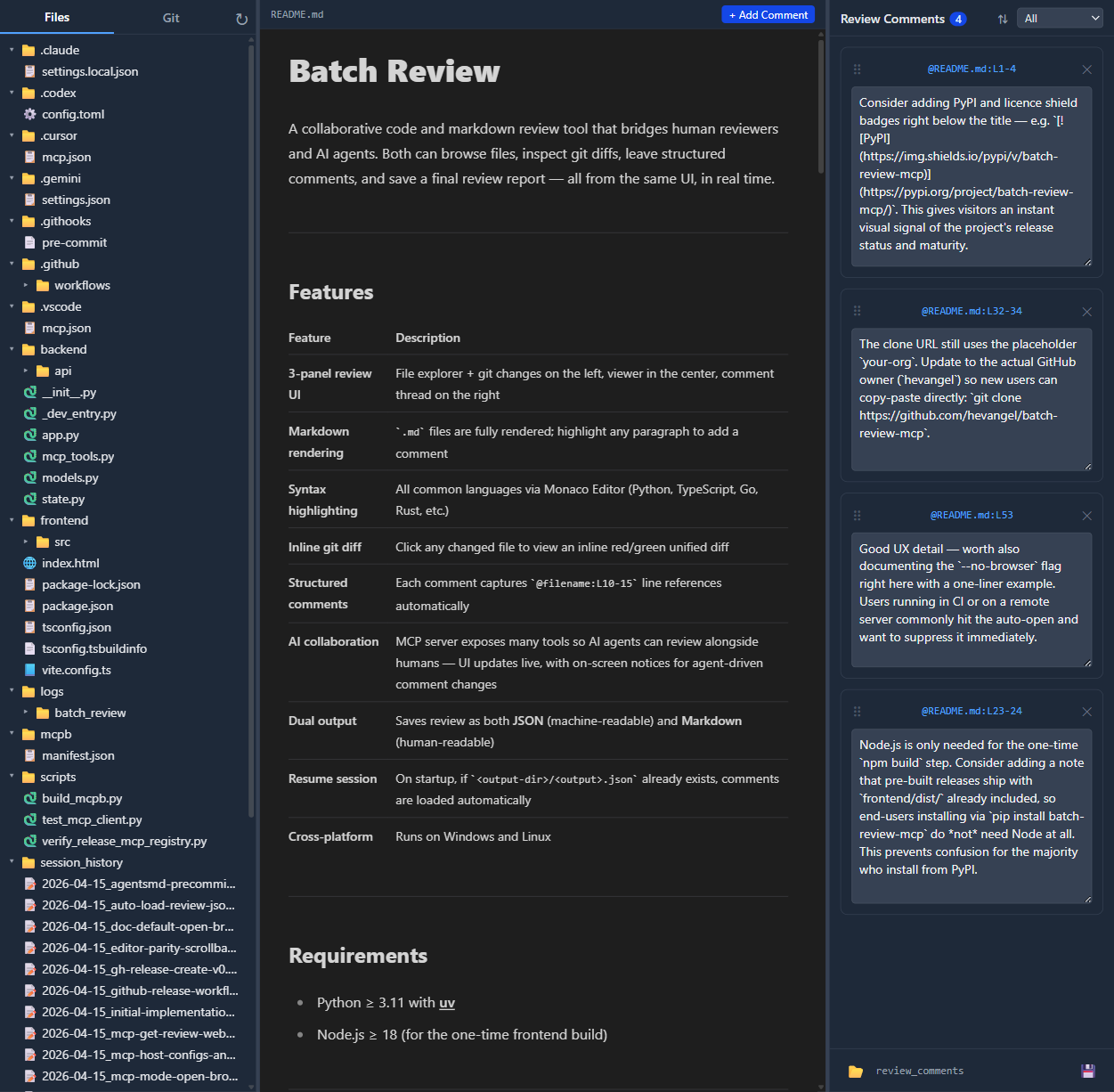
A collaborative code and markdown review tool that bridges human reviewers and AI agents. Both can browse files, inspect git diffs, leave structured comments, and save a final review report — all from the same UI, in real time.
Features
| Feature | Description |
|---|---|
| 3-panel review UI | File explorer + git changes on the left, viewer in the center, comment thread on the right |
| Markdown rendering | .md files are fully rendered; highlight any paragraph to add a comment |
| Syntax highlighting | All common languages via Monaco Editor (Python, TypeScript, Go, Rust, etc.) |
| Inline git diff | Click any changed file to view an inline red/green unified diff |
| Structured comments | Each comment captures @filename:L10-15 line references automatically |
| AI collaboration | MCP server exposes many tools so AI agents can review alongside humans — UI updates live, with on-screen notices for agent-driven comment changes |
| Dual output | Saves review as both JSON (machine-readable) and Markdown (human-readable) |
| Resume session | On startup, if <output-dir>/<output>.json already exists, comments are loaded automatically |
| Cross-platform | Runs on Windows and Linux |
Requirements
- Python ≥ 3.11 with uv
- Node.js ≥ 18 (for the one-time frontend build)
Installation
git clone https://github.com/your-org/batch-review-mcp
cd batch-review-mcp
uv sync
The first run will automatically build the React frontend if frontend/dist/ does not exist (requires Node.js + npm on PATH).
Usage
Standalone mode (browser opens by default)
# Review the current directory
uv run batch-review

# Review a specific git repository
uv run batch-review --root /path/to/your/repo

# Custom host / port
uv run batch-review --root /path/to/repo --host 0.0.0.0 --port 9100

# Specify output filenames
uv run batch-review --root /path/to/repo --output review --output-dir /tmp/reviews
# → saves /tmp/reviews/review.json and /tmp/reviews/review.md
The server auto-selects a free port in the 9000–9999 range if the default port is already in use.
MCP stdio mode (Claude Desktop / Cursor / any MCP client; browser opens by default)
uv run batch-review --mcp --root /path/to/repo
The HTTP server starts in a background thread (so the browser UI remains accessible), your default browser opens to the app URL (same as standalone mode; use --no-browser to skip), and the MCP stdio transport runs in the main thread.
Claude Desktop config (claude_desktop_config.json):
{
  "mcpServers": {
    "batch-review": {
      "command": "uv",
      "args": ["run", "batch-review", "--mcp", "--root", "/path/to/repo"]
    }
  }
}
Official MCP registry
This project includes a root-level server.json for the Model Context Protocol registry (preview). The entry uses registryType": "mcpb": the download URL must be a public GitHub release asset, and fileSha256 must match those bytes exactly (the Release workflow builds the .mcpb on Linux, which can differ from a pack produced on Windows).
Recommended order for a new version (e.g. v0.2.0):
- Bump
versioninpyproject.toml,mcpb/manifest.json, andserver.json(top-levelversionpluspackages[0].identifierURL:.../releases/download/v0.2.0/batch-review-mcp-0.2.0.mcpb). - In GitHub Actions, run MCP registry preflight (Linux MCPB hash) (
workflow_dispatch). Open the job summary and copy the printed SHA-256 intoserver.json→packages[0].fileSha256. Commit and push tomain
Test This Server
No automated test available for this server. Check the GitHub README for setup instructions.
Help improve this page
This server is missing a description. Tools and install config are also missing.If you've used it, help the community.
Add informationScore Breakdown
Security
3/30No known vulnerabilities.
○
Known CVEs — No package registry to scan
○
Tool safety — No tools to analyze
○
Tool poisoning — No tools to analyze
○
Injection vectors — No tools to analyze
✓
Tool stability — Tool definitions stable
○
Dependency health — No package to analyze
✗
License — No license specified
○
Authentication — No authentication required
○
Repository — active repo
CVEs checked daily via OSV.dev. Score algorithm is open source.
Reviews
Have you used this server?
Share your experience — it helps other developers decide.
How easy was setup?Did it work reliably?How was the documentation?
Sign in to write a review.
Frequently Asked Questions
- Is io.github.hevangel/batch-review-mcp safe to use?
- io.github.hevangel/batch-review-mcp has no known CVEs as of the latest MCPpedia security scan. It does not require authentication, so any local process can connect — keep this in mind in shared environments.
- How do I install io.github.hevangel/batch-review-mcp?
- io.github.hevangel/batch-review-mcp can be installed by cloning its GitHub repository and following the setup instructions in the README.
- What AI clients work with io.github.hevangel/batch-review-mcp?
- io.github.hevangel/batch-review-mcp is compatible with Claude Desktop, Cursor, Claude Code, and most MCP clients that support stdio transport. It uses stdio transport.
- Is io.github.hevangel/batch-review-mcp actively maintained?
- io.github.hevangel/batch-review-mcp is actively maintained — last commit was 1 day ago. It has 1 GitHub stars.
Similar servers
View all →
Sequential Thinking MCP Server
OfficialNo CVEs98A
Dynamic problem-solving through sequential thought chains
1 toolsstdio84.0k112.2k/wk2d ago

XcodeBuildMCP
OfficialNo CVEs97A
A Model Context Protocol (MCP) server and CLI that provides tools for agent use when working on iOS and macOS projects.
2 toolsremote5.2k46.6k/wk1d ago
Python Sdk
OfficialNo CVEs95A
The official Python SDK for Model Context Protocol servers and clients
1 toolsremote22.7k166.4k/wk13h ago

Gemini Cli
No CVEs95A
An open-source AI agent that brings the power of Gemini directly into your terminal.
8 toolsremote101.5k891.1k/wk5h ago
MCP Security Weekly
Get CVE alerts and security updates for io.github.hevangel/batch-review-mcp and similar servers.
Discussion
Start a conversation
Ask a question, share a tip, or report an issue.
Has anyone used this with Cursor?How do you handle auth?Any alternatives?
Sign in to join the discussion.