Step 1
Install in your client
Config is the same across clients — only the file and path differ.
CD
Supported in Claude Desktopstdio, sse, http · Node 18+
Paste into ~/Library/Application Support/Claude/claude_desktop_config.json
{
  "mcpServers": {
    "traveler": {
      "env": {
        "MT_BS_ID": "(Bluesky sns registration address)",
        "MT_SD_KEY": "(or Stability.ai image generation API key",
        "MT_BS_PASS": "(bluesky sns password)",
        "MT_FEED_TAG": "(Optional: Specify the feed tag when posting to SNS (#required, 15 characters or more) Default is #geo_less_traveler)",
        "MT_NO_IMAGE": "(Options: true = do not output image, not specified = output image if possible, default is not specified)",
        "MT_BS_HANDLE": "(bluesky sns handle name: e.g. xxxxxxxx.bsky.social )",
        "MT_COMFY_URL": "(Option: Generate image using ComfyUI API at specified URL. Example: http://192.168.1.100:8188)",
        "MT_MOVE_MODE": "(Option: Specify whether the movement mode is realtime or skip. default realtime)",
        "MT_NO_AVATAR": "(Option: true = Output StreetView image as is without avatar superimposition. Not specified = Superimpose avatar image. Default is not specified.)",
        "MT_PIXAI_KEY": "(pixAi API key)",
        "MT_REMBG_URL": "(rembg API URL)",
        "MT_TURSO_URL": "(Turso sqlite API URL)",
        "MT_REMBG_PATH": "(absolute path of the installed rembg cli)",
        "MT_TIME_SCALE": "(Optional:Scale of travel time on real roads duration. default 4)",
        "MT_IMAGE_WIDTH": "(Option: Output image width (pixels) Default is 512)",
        "MT_MAP_API_URL": "(Optional: Map API custom endpoint. Example: direction=https://xxxx,places=https://yyyy )",
        "MT_SQLITE_PATH": "(db save path: e.g. %USERPROFILE%/Desktop/traveler.sqlite ,$HOME/traveler.sqlite )",
        "MT_TURSO_TOKEN": "(Turso sqlite API access token)",
        "MT_COMFY_PARAMS": "(Optional: Variable values to send to the workflow via comfyUI API)",
        "MT_FILTER_TOOLS": "(Optional: Directly filter the tools to be used. All are available if not specified. e.g. tips,set_traveler_location)",
        "MT_MAX_SESSIONS": "(Maximum number of sessions when using Streamable-http)",
        "MT_REMBG_WO_KEY": "(withoutbg.com rembg API key)",
        "MT_BODY_HW_RATIO": "(Optional: Acceptable avatar image aspect ratios. default 1.5~2.3)",
        "MT_GOOGLE_MAP_KEY": "(Google Map API key)",
        "MT_PIXAI_MODEL_ID": "(Optional: pixAi ModelId, if not set use default model 1648918127446573124 ",
        "MT_SERVICE_TTL_MS": "(Service TTL when using Streamable-http)",
        "MT_SESSION_TTL_MS": "(Session TTL when using Streamable-http)",
        "MT_BODY_AREA_RATIO": "(Optional: Acceptable avatar image area ratio. default 0.042)",
        "MT_AVATAR_IMAGE_URI": "(Character reference image uri (file:// or https://) when generating Gemini image. Multiple settings can be made by separating them with the '|'. When multiple settings are made, they will be selected randomly.)",
        "MT_GEMINI_IMAGE_KEY": "(Gemini Image Api key)",
        "MT_MAX_RETRY_GEMINI": "(Number of retries when generating Gemini images Default: 0)",
        "MT_COMFY_WORKFLOW_I2I": "(Optional: Path of API workflow file when image to image in ComfyUI. If not specified: assets/comfy/i2i_sample.json)",
        "MT_COMFY_WORKFLOW_T2I": "(Optional: Path to API workflow file when using text to image with ComfyUI. If not specified: assets/comfy/t2i_sample.json)",
        "MT_FIXED_MODEL_PROMPT": "(Optional: Fixed avatar generation prompt. You will no longer be able to change your avatar during conversations.)",
        "MT_BODY_WINDOW_RATIO_H": "(Optional: Avatar composite window aspect ratio. default 0.75)",
        "MT_BODY_WINDOW_RATIO_W": "(Optional: Avatar composite window horizontal ratio. default 0.5)"
      },
      "args": [
        "-y",
        "@mfukushim/map-traveler-mcp"
      ],
      "command": "npx"
    }
  }
}
Are you the author?
Add this badge to your README to show your security score and help users find safe servers.
Embed in your READMEAbout badges →
[](https://mcppedia.org/s/io-github-mfukushim-map-traveler-mcp)
Read me
What Virtual traveler library for MCP does
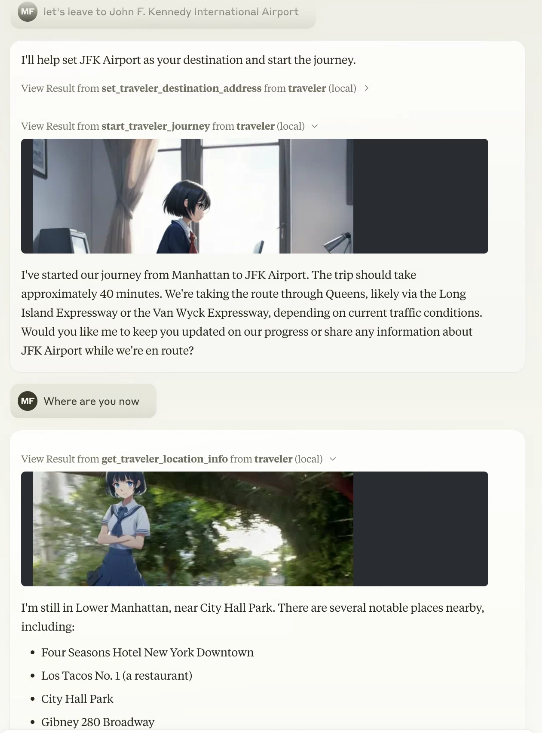
This is an MCP server that creates an environment for an avatar to virtually travel on Google Maps.
Test This Server
Run this in your terminal to verify the server starts. Then let us know if it worked — your result helps other developers.
npx -y '@mfukushim/map-traveler-mcp' 2>&1 | head -1 && echo "✓ Server started successfully"
After testing, let us know if it worked:
Loading README…
Scored, not listed
Why this score
Five weighted categories — click any category to see the underlying evidence.
Score breakdown
74/100across 5 weighted dimensions
0255075100
30
16
15
10
−26
Security
Maintenance
Efficiency
Documentation
Compatibility
Categoriesclick a row to see evidence
Security
OSV.devNo known CVEs.
Checked @mfukushim/map-traveler-mcp against OSV.dev.
Inventory
Tools (19)
Click any tool to inspect its schema.
~1.3k tokens total
Inventory
Resources (5)
role.txtClaude will act as a traveler.
role.txt
roleWithSns.txtClaude will act as a traveler. It also controls reading and posting to SNS.
roleWithSns.txt
carBattle.txtA small novel game about a story of transporting secret documents from Yokohama to Tokyo. Scenes are automatically generated. Set moveMode=skip to play.
carBattle.txt
japanMapChallenge.txtTwo AIs communicate with each other via SNS and play a challenge game using landscape images.
japanMapChallenge.txt
japanMapChallenge2.txtTwo AIs communicate with each other via SNS and play a challenge game using landscape images with a challenge reflection rule.
japanMapChallenge2.txt
Community
Reviews
Be the first to review
Have you used this server?
Share your experience — it helps other developers decide.
How easy was setup?Did it work reliably?How was the documentation?
Sign in to write a review.
Frequently Asked Questions
- Is Virtual traveler library for MCP safe to use?
- Virtual traveler library for MCP has no known CVEs as of the latest MCPpedia security scan. It does not require authentication, so any local process can connect — keep this in mind in shared environments.
- How do I install Virtual traveler library for MCP?
- Virtual traveler library for MCP supports copy-paste install configs on its MCPpedia page for Claude Desktop, Cursor, and Claude Code. Scroll to the Quick Install section and select your client.
- What can Virtual traveler library for MCP do?
- Virtual traveler library for MCP provides 19 tools: get_traveler_view_info, get_traveler_location, reach_a_percentage_of_destination, set_traveler_location, get_traveler_destination_address and 14 more. See the full tools list on the server page for descriptions and parameters.
- What AI clients work with Virtual traveler library for MCP?
- Virtual traveler library for MCP is compatible with claude-desktop, cursor, claude-code. It uses stdio and sse and http transport.
- Is Virtual traveler library for MCP actively maintained?
- Virtual traveler library for MCP is less actively maintained — last commit was 218 days ago. It has 23 GitHub stars.
Related
Similar servers
Others in maps / entertainment
 Unity MCP93
AI Skills, MCP Tools, and CLI for Unity Engine. Full AI develop and test loop. Use cli for quick setup. Efficient token usage, advanced tools. Any C# method may be turned into a tool by a single line. Works with Claude Code, Gemini, Copilot, Cursor and any other absolutely for free.
3.4k 7
 Spotify Mcp Server91
Lightweight MCP server for Spotify
378 17
 Unity Mcp Server90
Unity MCP Server — 268 tools for AI-assisted game development. Connect Claude, Cursor, or any MCP client to Unity Editor & Unity Hub. Scene management, GameObjects, components, builds, profiling, Shader Graph, Amplify, terrain, physics, NavMesh, animation, MPPM multiplayer & more. Free & open source by AnkleBreaker Studio.
303 2
 Qveris Agent Toolkit90
Open-source toolkit for the QVeris capability routing network: CLI, MCP server, Python SDK, skills, and REST API docs for agents to discover, inspect, call, and audit real-world tools.
237 5
MCP Security Weekly
Get CVE alerts and security updates for Virtual traveler library for MCP and similar servers.
Community
Discussion
Start a conversation
Ask a question, share a tip, or report an issue.
Has anyone used this with Cursor?How do you handle auth?Any alternatives?
Sign in to join the discussion.