I
io.github.MobileReality/mdma
MCP server for MDMA — exposes spec, prompts, docs, and package metadata to AI assistants.
UnknownNot tested
16FNo CVEsunknown
Quick Install
{
  "mcpServers": {
    "io-github-mobilereality-mdma": {
      "command": "<see-readme>",
      "args": []
    }
  }
}No install config available. Check the server's README for setup instructions.
Are you the author?
Add this badge to your README to show your security score and help users find safe servers.
Embed in your READMEAbout badges →
[](https://mcppedia.org/s/io-github-mobilereality-mdma)
Should you use this server?
MCP server for MDMA — exposes spec, prompts, docs, and package metadata to AI assistants.
✓
Is it safe?
No package registry to scan.
No authentication — any process on your machine can connect.
License not specified.
~
Is it maintained?
Commit history unknown.
i
Will it work with my client?
Transport: stdio. Works with Claude Desktop, Cursor, Claude Code, and most MCP clients.
README

MDMA
Markdown Document with Mounted Applications
Interactive documents from Markdown. Built for next gen-apps
Why MDMA?
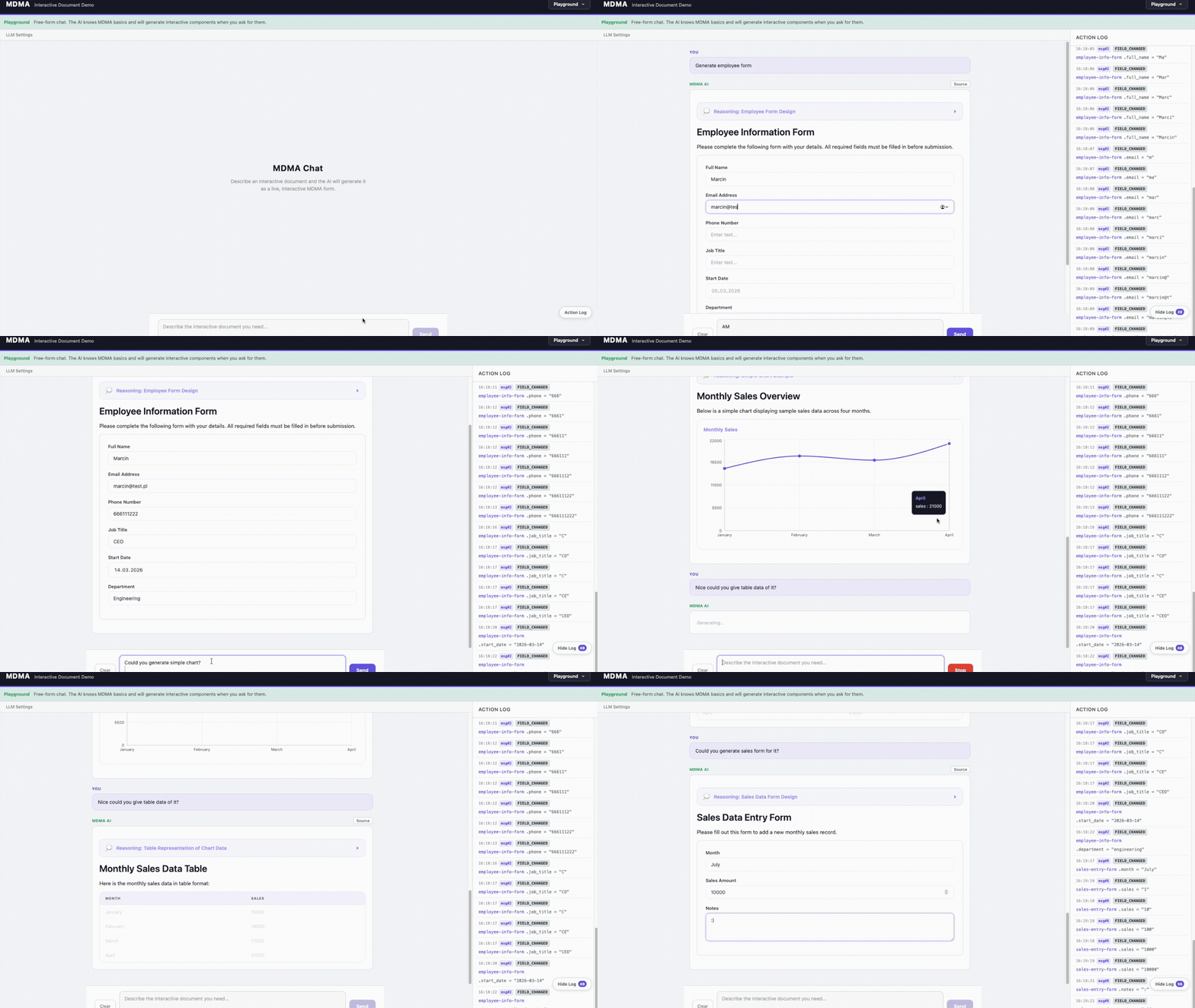
AI conversations today are plain text — the user reads a response and manually acts on it. MDMA changes that. When an LLM knows the MDMA spec, it can respond with interactive components (forms, tables, approval gates) instead of just text. The conversation becomes actionable: the user fills out a form, approves a step, or reviews structured data — all inline, with a predictable schema that your app already knows how to render and process.
No custom UI per use case. No parsing free-form text. The AI generates structured, validated components and your frontend renders them instantly.
What is MDMA?
MDMA extends Markdown with interactive components defined in fenced mdma code blocks. A regular Markdown file becomes an interactive application:
# Patient Intake

```mdma
type: form
id: intake-form
fields:
  - name: patient-name
    type: text
    label: "Full Name"
    required: true
    sensitive: true
  - name: email
    type: email
    label: "Email"
    required: true
    sensitive: true
  - name: reason
    type: textarea
    label: "Reason for Visit"
    required: true
```

```mdma
type: button
id: submit-btn
text: "Submit Intake Form"
variant: primary
onAction: submit
```
Components
9 built-in component types, all rendered out of the box by @mobile-reality/mdma-renderer-react:
| Component | Type key | Description |
|---|---|---|
| Form | form | Multi-field forms with text, email, number, select, textarea, checkbox, and datetime fields. Supports validation, required fields, default values, and sensitive (PII) flags. |
| Button | button | Action buttons with primary, secondary, and danger variants. |
| Tasklist | tasklist | Interactive checkbox task items with labels. |
| Table | table | Data tables with typed columns and row data. |
| Chart | chart | Table fallback by default — renders chart data as a simple HTML table to avoid forcing a charting dependency (~400KB). Override with your own renderer (e.g. recharts) via customizations.components.chart (see Custom Chart Renderer below). |
| Callout | callout | Alert banners with info, warning, error, and success variants. Supports optional title and dismiss button. |
| Approval Gate | approval-gate | Approve/deny workflow gates with pending, approved, and denied states. |
| Webhook | webhook | Webhook triggers with idle, executing, success, and error status indicators. |
| Thinking | thinking | Collapsible thinking/reasoning blocks that show the AI's chain of thought. |
Additionally, standard Markdown content (headings, paragraphs, lists, code blocks, images, links, tables, etc.) is rendered inline between components.
Custom Chart Renderer
The built-in chart renderer intentionally renders data as a plain table so the library stays lightweight. To get actual charts, register a custom renderer:
import { MdmaDocument } from '@mobile-reality/mdma-renderer-react';
import { MyRechartsRenderer } from './MyRechartsRenderer';

function App({ ast, store }) {
  return (
    <MdmaDocument
      ast={ast}
      store={store}
      customizations={{
        components: {
          chart: MyRechartsRenderer,
        },
      }}
    />
  );
}
This pattern works for overriding any built-in component — pass a custom React component under customizations.components.<type>.
Installation
# Core — parse and run MDMA documents
npm install @mobile-reality/mdma-parser @mobile-reality/mdma-runtime

# React rendering
npm install @mobile-reality/mdma-rendere

... [View full README on GitHub](https://github.com/MobileReality/mdma#readme)
Test This Server
No automated test available for this server. Check the GitHub README for setup instructions.
Help improve this page
This server is missing a description. Tools and install config are also missing.If you've used it, help the community.
Add informationScore Breakdown
Security
3/30No known vulnerabilities.
○
Known CVEs — No package registry to scan
○
Tool safety — No tools to analyze
○
Tool poisoning — No tools to analyze
○
Injection vectors — No tools to analyze
✓
Tool stability — Tool definitions stable
○
Dependency health — No package to analyze
✗
License — No license specified
○
Authentication — No authentication required
○
Repository — active repo
CVEs checked daily via OSV.dev. Score algorithm is open source.
Reviews
Have you used this server?
Share your experience — it helps other developers decide.
How easy was setup?Did it work reliably?How was the documentation?
Sign in to write a review.
Frequently Asked Questions
- Is io.github.MobileReality/mdma safe to use?
- io.github.MobileReality/mdma has no known CVEs as of the latest MCPpedia security scan. It does not require authentication, so any local process can connect — keep this in mind in shared environments.
- How do I install io.github.MobileReality/mdma?
- io.github.MobileReality/mdma can be installed by cloning its GitHub repository and following the setup instructions in the README.
- What AI clients work with io.github.MobileReality/mdma?
- io.github.MobileReality/mdma is compatible with Claude Desktop, Cursor, Claude Code, and most MCP clients that support stdio transport. It uses stdio transport.
Similar servers
View all →
Sequential Thinking MCP Server
OfficialNo CVEs98A
Dynamic problem-solving through sequential thought chains
1 toolsstdio84.0k112.2k/wk2d ago

XcodeBuildMCP
OfficialNo CVEs97A
A Model Context Protocol (MCP) server and CLI that provides tools for agent use when working on iOS and macOS projects.
2 toolsremote5.2k46.6k/wk1d ago
Python Sdk
OfficialNo CVEs95A
The official Python SDK for Model Context Protocol servers and clients
1 toolsremote22.7k166.4k/wk13h ago

Gemini Cli
No CVEs95A
An open-source AI agent that brings the power of Gemini directly into your terminal.
8 toolsremote101.5k891.1k/wk5h ago
MCP Security Weekly
Get CVE alerts and security updates for io.github.MobileReality/mdma and similar servers.
Discussion
Start a conversation
Ask a question, share a tip, or report an issue.
Has anyone used this with Cursor?How do you handle auth?Any alternatives?
Sign in to join the discussion.