
PreviewsMCP
Render and interact with SwiftUI previews outside of Xcode. CLI and MCP server for AI-driven UI development.
ActiveNot tested
★ 3GitHub
31DNo CVEsactiveMIT
Quick Install
{
  "mcpServers": {
    "previewsmcp": {
      "command": "<see-readme>",
      "args": []
    }
  }
}No install config available. Check the server's README for setup instructions.
Are you the author?
Add this badge to your README to show your security score and help users find safe servers.
Embed in your READMEAbout badges →
[](https://mcppedia.org/s/previewsmcp)
Should you use this server?
Render and interact with SwiftUI previews outside of Xcode. CLI and MCP server for AI-driven UI development.
✓
Is it safe?
No package registry to scan.
No authentication — any process on your machine can connect.
MIT. View license →
✓
Is it maintained?
Last commit 1 days ago. 3 stars.
i
Will it work with my client?
Transport: stdio. Works with Claude Desktop, Cursor, Claude Code, and most MCP clients.
README

PreviewsMCP
A standalone SwiftUI preview host for humans and AI agents.
Run, snapshot, and interact with #Preview blocks from the command line or over MCP — no Xcode process required.
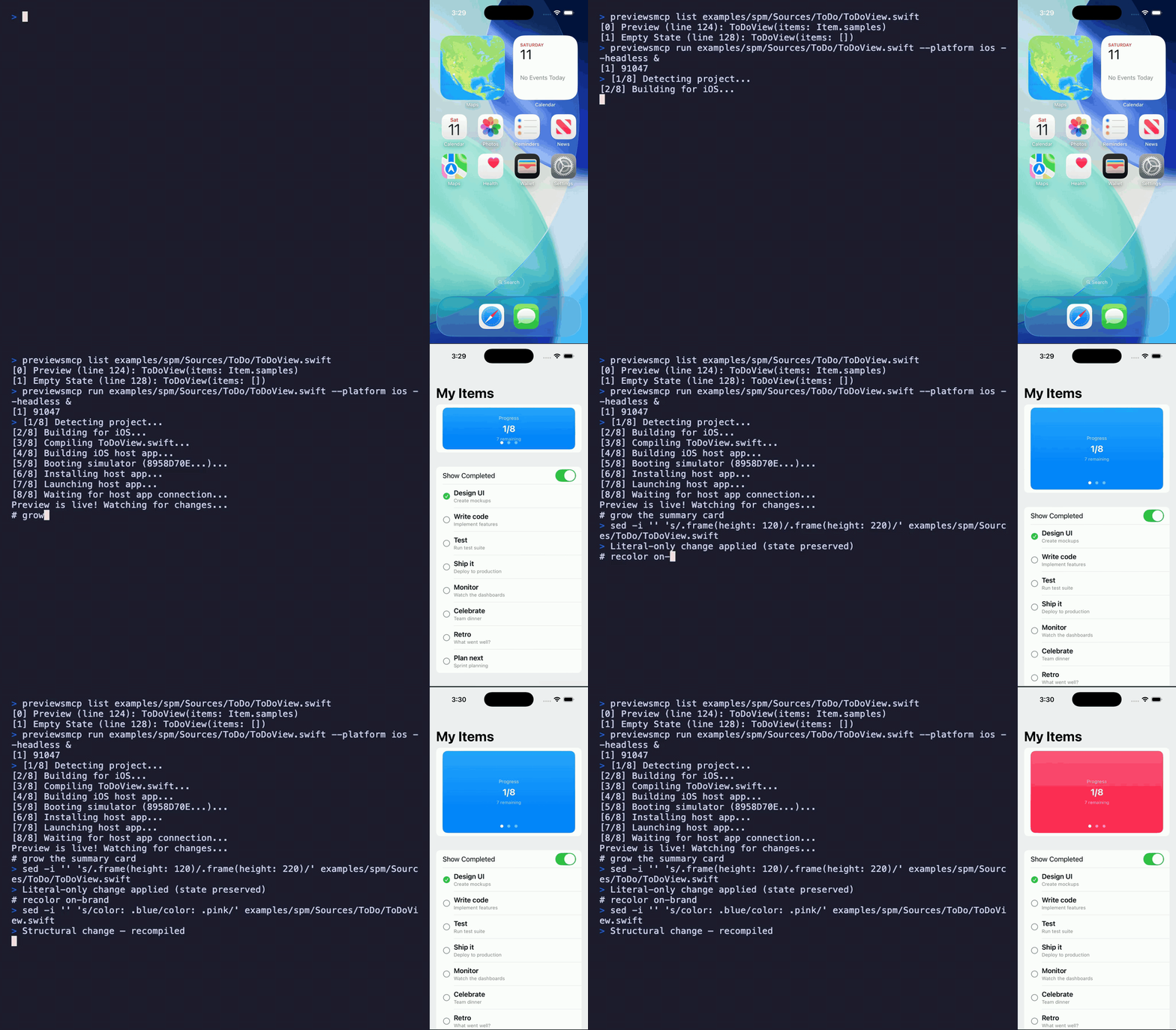
Quickstart
git clone https://github.com/obj-p/PreviewsMCP.git
cd PreviewsMCP
swift run previewsmcp examples/spm/Sources/ToDo/ToDoView.swift
A live macOS preview window opens. Edit the source file and the window hot-reloads.
Why PreviewsMCP?
PreviewsMCP compiles your #Preview closure into a dylib and loads it into a real app process (macOS NSApplication or iOS simulator UIApplication) with hot-reload — driven entirely from the command line or over MCP. No Xcode process required.
That makes it a standalone, extensible preview workflow:
- CLI and MCP-native — preview, snapshot, and iterate from the terminal or let an AI agent drive the loop
- Hot-reload — edit a file, see changes immediately, with
@Statepreserved across literal edits - Trait and variant sweeps — render one preview across color schemes, dynamic type sizes, locales, and layout directions in a single call
- iOS interaction — walk the accessibility tree and inject taps/swipes through an in-simulator touch bridge
- Build system flexible — works with SPM, Xcode projects (
.xcodeproj/.xcworkspace), and Bazel
Solving the Xcode preview sandbox problem
Xcode previews run your code inside Apple's preview agent — a real app process, but an opaque one. You can't hook into its lifecycle, run your own initialization, or extend it. FirebaseApp.configure(), custom font registration, auth setup, and DI containers have nowhere to run. The ecosystem answer is "mock everything," and at scale teams maintain micro apps — standalone app targets that render a single feature with controlled dependencies. Airbnb's dev apps drive over 50% of local iOS builds. Point-Free's isowords has 9 preview apps. Every team pays the maintenance tax: separate targets, schemes, and mock setups that drift.
Because PreviewsMCP hosts your preview in its own app process, you can extend that process. The setup plugin provides the hook: a PreviewSetup protocol where setUp() runs once per session (SDK init, auth, font registration, DI container) and wrap() surrounds every preview render (themes, environment values). It's the micro app's dependency layer extracted into a reusable framework — without maintaining a separate app target.
Installation
Homebrew
brew tap obj-p/tap
brew install previewsmcp
From source
git clone https://github.com/obj-p/PreviewsMCP.git
cd PreviewsMCP
swift build -c release
The binary is at .build/release/previewsmcp.
Requirements
- macOS 14+
- Xcode 16+ (for iOS simulator support)
- Apple Silicon
Capabilities
- Live previews — hot-reload SwiftUI on macOS or a real iOS simulator, preserving
@Statewhere it can. - Variant & trait sweeps — render one preview across many trait combinations (
colorScheme,dynamicTypeSize,locale,layoutDirection,legibilityWeight) in a single call, with presets for light/dark,xSmall–accessibility5,rtl,ltr, andboldText. - Multi-preview selection —
#Previewmacros and legacyPreviewProvider, with mid-session switching. - iOS interaction — walk the accessibility tree and inject taps/swipes through an in-simulator touch bridge.
- Setup plugin — one-time SDK init, auth, and DI registration via
setUp(), per-render theme/environment wrapping viawrap(). See the full integration guide. - Project config
Test This Server
No automated test available for this server. Check the GitHub README for setup instructions.
Help improve this page
This server is missing a description. Tools and install config are also missing.If you've used it, help the community.
Add informationScore Breakdown
Security
6/30No known vulnerabilities.
○
Known CVEs — No package registry to scan
○
Tool safety — No tools to analyze
○
Tool poisoning — No tools to analyze
○
Injection vectors — No tools to analyze
✓
Tool stability — Tool definitions stable
○
Dependency health — No package to analyze
✓
License — License: MIT
○
Authentication — No authentication required
○
Repository — active repo
CVEs checked daily via OSV.dev. Score algorithm is open source.
Reviews
Have you used this server?
Share your experience — it helps other developers decide.
How easy was setup?Did it work reliably?How was the documentation?
Sign in to write a review.
Frequently Asked Questions
- Is PreviewsMCP safe to use?
- PreviewsMCP has no known CVEs as of the latest MCPpedia security scan. It does not require authentication, so any local process can connect — keep this in mind in shared environments. Licensed under MIT.
- How do I install PreviewsMCP?
- PreviewsMCP can be installed by cloning its GitHub repository and following the setup instructions in the README.
- What AI clients work with PreviewsMCP?
- PreviewsMCP is compatible with Claude Desktop, Cursor, Claude Code, and most MCP clients that support stdio transport. It uses stdio transport.
- Is PreviewsMCP actively maintained?
- PreviewsMCP is actively maintained — last commit was 1 day ago. It has 3 GitHub stars.
Similar servers
View all →
XcodeBuildMCP
OfficialNo CVEs97A
A Model Context Protocol (MCP) server and CLI that provides tools for agent use when working on iOS and macOS projects.
2 toolsremote5.2k46.6k/wk1d ago

Gemini Cli
No CVEs95A
An open-source AI agent that brings the power of Gemini directly into your terminal.
8 toolsremote101.3k814.6k/wk12h ago
X
XcodeBuildMCP
No CVEs95A
XcodeBuildMCP provides tools for Xcode project management, simulator management, and app utilities.
1 toolsremote5.2k20.6k/wk15d ago

Mcp Server Typescript
No CVEs94A
DataForSEO API modelcontextprotocol server
9 toolsremote1764.6k/wk1d ago
MCP Security Weekly
Get CVE alerts and security updates for PreviewsMCP and similar servers.
Discussion
Start a conversation
Ask a question, share a tip, or report an issue.
Has anyone used this with Cursor?How do you handle auth?Any alternatives?
Sign in to join the discussion.