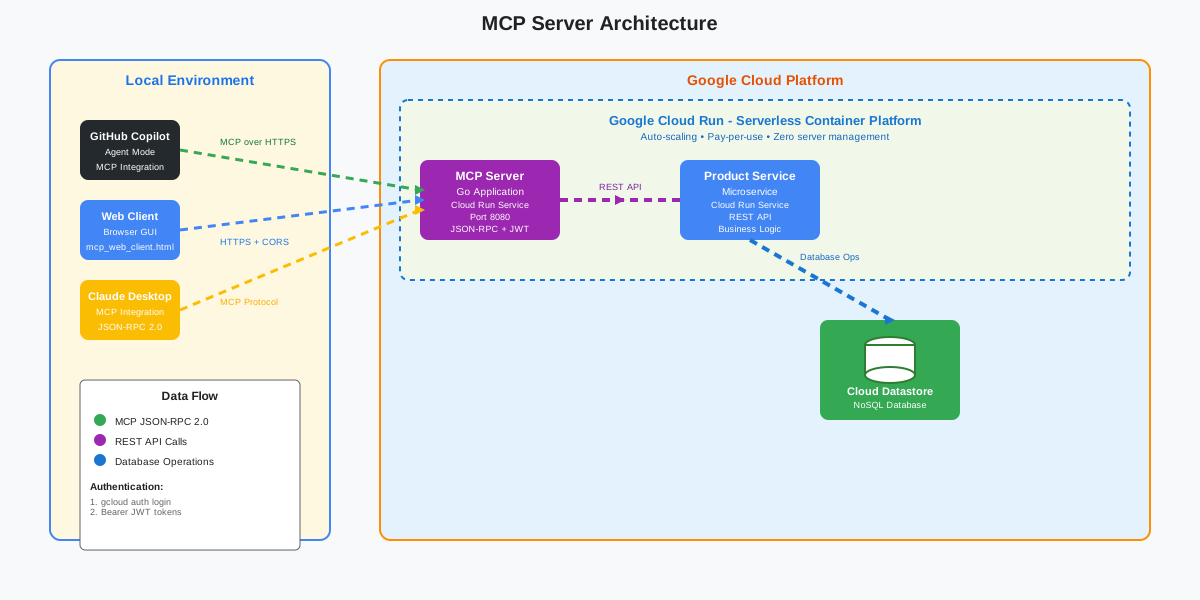
A POC Model Context Protocol (MCP) server for product management. Easily connect AI agents and apps to a product microservice using simple JSON-RPC requests for listing, adding, updating, or deleting products. Designed for fast integration and automation.
{
"mcpServers": {
"ravi-mcp-server": {
"command": "<see-readme>",
"args": []
}
}
}No install config available. Check the server's README for setup instructions.
Are you the author?
Add this badge to your README to show your security score and help users find safe servers.
A POC Model Context Protocol (MCP) server for product management. Easily connect AI agents and apps to a product microservice using simple JSON-RPC requests for listing, adding, updating, or deleting products. Designed for fast integration and automation.
Is it safe?
No package registry to scan.
No authentication — any process on your machine can connect.
License not specified.
Is it maintained?
Last commit 184 days ago.
Will it work with my client?
Transport: stdio, http. Works with Claude Desktop, Cursor, Claude Code, and most MCP clients.
No automated test available for this server. Check the GitHub README for setup instructions.
No known vulnerabilities.
This server is missing a description. Tools and install config are also missing.If you've used it, help the community.
Add informationHave you used this server?
Share your experience — it helps other developers decide.
Sign in to write a review.
Dynamic problem-solving through sequential thought chains
A Model Context Protocol server for searching and analyzing arXiv papers
An open-source AI agent that brings the power of Gemini directly into your terminal.
The official Python SDK for Model Context Protocol servers and clients
MCP Security Weekly
Get CVE alerts and security updates for Ravi Mcp Server and similar servers.
Start a conversation
Ask a question, share a tip, or report an issue.
Sign in to join the discussion.
This project is a simple example of a Model Context Protocol (MCP) server for product management. It lets you use easy, standard requests (JSON-RPC 2.0) to list, add, update, or delete products.
The server connects AI agents or other programs to a product microservice, making it easier to manage product data automatically or through natural language commands. This proof-of-concept shows how MCP can help organize and automate product management tasks.
API Version: v1.0.0
See docs/api.md for a full API reference, including all methods, required parameters, and example payloads. If you change the API, increment the version and update the documentation.
This project implements a MCP wrapper server using the Model Context Protocol (MCP) that allows AI agents to interact with a microservice called product service that provides the product data.
It provides tools for:
Clone the repository and open it in VSCode.
git clone https://github.com/racho8/ravi-mcp-server.git
cd <repository_name>
code .
Setup Configuration Files
Copy mcp.json and payload.json from docs/configuration to a new folder called .vscode in your repository.
mkdir .vscode
cp docs/configuration/mcp.json .vscode/
cp docs/configuration/payload.json .vscode/
Start the MCP Server
Start the ravi-mcp-server by clicking the start button in the mcp.json file in vscode.
Note: Sometime, it might show as Error next to the server, but it still works.
Export GCP Authentication Token (Very Important, otherwise it won't work)
Run the following command to export your GCP authentication token.
export gcp_auth_token=$(gcloud auth print-identity-token)
Note: Ensure your account has the Cloud Run Invoker role (contact the repository owner if unsure).
Test with GitHub Copilot Chat in Agent Mode
Open GitHub Copilot chat in agent mode and test with the following natural language commands:
Use the remote ravi-mcp-server endpoint in mcp.json to list all tools by sending a tools/list request. Then you can fire nlp querries like:
- show me all the available tools
- Show all the products
- List all products under Electronics category
- Increment the price of all the products under Electronics category by 2%
- Round up the price of all the products under Laptops segment to nearest 100
The agent should automatically generate and execute the corresponding cURL requests in the background and display the results.
Hack(Optional): If the agent asks you to run the cURL command everytime you give ask a question, you can give below prompt to bypass it:
Prompt: Automatically generate and execute the required cURL requests in the background for any command I provide related to ravi-mcp-server. Display the results directly in plain text format, structured as well-organized tables or lists for better readability. Do not ask for approval before executing each and every cURL command.
Prerequisites
Setup
go mod download
Note: Contact repository owner for MICROSERVICE_URL and GCP authentication token.
export MICROSERVICE_URL="<your_microservice_url>"
export gcp_auth_token=$(gcloud auth print-identity-token)
export PORT=8080
... [View full README on GitHub](https://github.com/racho8/ravi-mcp-server#readme)