{
"mcpServers": {
"spire-xls-mcp-server": {
"command": "<see-readme>",
"args": []
}
}
}No install config available. Check the server's README for setup instructions.
Are you the author?
Add this badge to your README to show your security score and help users find safe servers.
Spire.XLS MCP Server, using Spire.XLS on mcp tools
Is it safe?
No package registry to scan.
No authentication — any process on your machine can connect.
MIT. View license →
Is it maintained?
Last commit 206 days ago. 6 stars.
Will it work with my client?
Transport: stdio. Works with Claude Desktop, Cursor, Claude Code, and most MCP clients.
No automated test available for this server. Check the GitHub README for setup instructions.
No known vulnerabilities.
This server is missing a description. Tools and install config are also missing.If you've used it, help the community.
Add informationHave you used this server?
Share your experience — it helps other developers decide.
Sign in to write a review.
Persistent memory using a knowledge graph
Privacy-first. MCP is the protocol for tool access. We're the virtualization layer for context.
Pre-build reality check. Scans GitHub, HN, npm, PyPI, Product Hunt — returns 0-100 signal.
Monitor browser logs directly from Cursor and other MCP compatible IDEs.
MCP Security Weekly
Get CVE alerts and security updates for Spire Xls Mcp Server and similar servers.
Start a conversation
Ask a question, share a tip, or report an issue.
Sign in to join the discussion.
The Spire.XLS MCP Server is a robust solution that empowers AI agents to work with Excel files using the Model Context Protocol (MCP). It is totally independent and doesn't require Microsoft Office to be installed on system. This tool enables AI agents to create, read, edit, and convert Excel workbooks seamlessly
git clone https://github.com/eiceblue/spire-xls-mcp-server.git
cd spire-xls-mcp-server
uv pip install -e .
Start the server (default port 8000):
uv run spire-xls-mcp-server
Custom port (e.g., 8080):
# Bash/Linux/macOS
export FASTMCP_PORT=8080 && uv run spire-xls-mcp-server
# Windows PowerShell
$env:FASTMCP_PORT = "8080"; uv run spire-xls-mcp-server
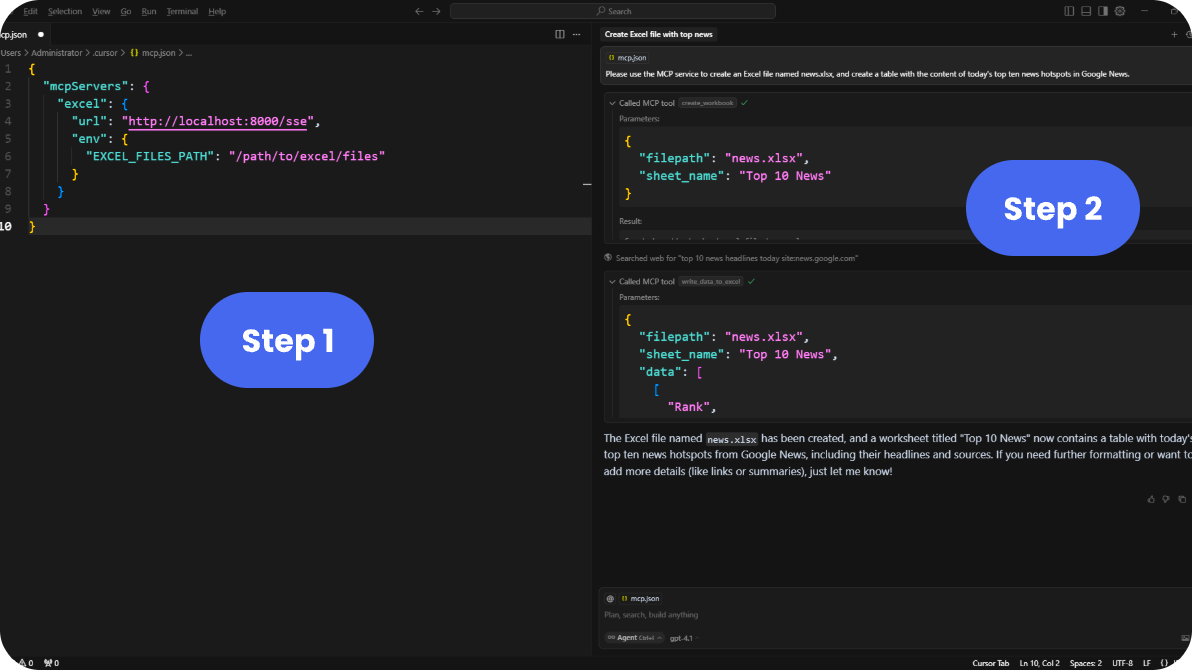
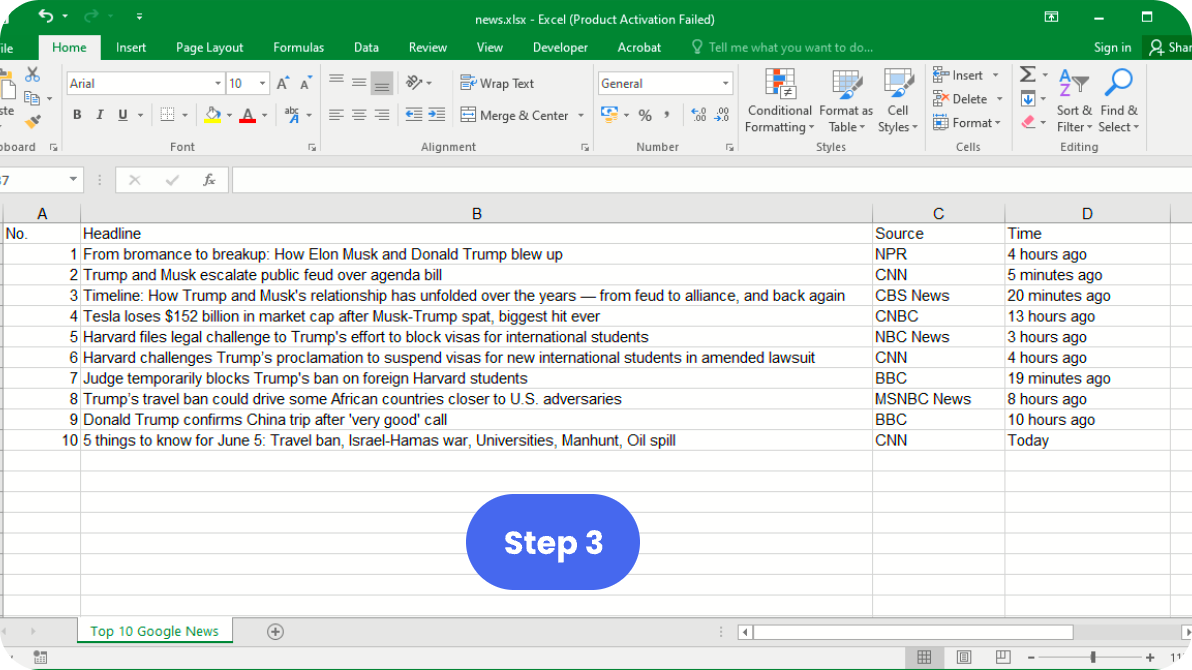
The following visual guide illustrates the three-step process to integrate Spire.XLS MCP Server with supported AI development environments:
Step 1 and Step 2: Start the server and configure AI tool

Step 3: Use Excel features through AI interface

{
"mcpServers": {
"excel": {
"url": "http://localhost:8000/sse",
"env": {
"EXCEL_FILES_PATH": "/path/to/excel/files"
}
}
}
}
This server uses Server-Sent Events (SSE) transport protocol. For different use cases:
Using with Claude Desktop (requires stdio):