Data Pipeline Automation Framework to build MCP servers, data APIs, and data lakes with SQL.
{
"mcpServers": {
"sqrl": {
"command": "<see-readme>",
"args": []
}
}
}No install config available. Check the server's README for setup instructions.
Are you the author?
Add this badge to your README to show your security score and help users find safe servers.
Data Pipeline Automation Framework to build MCP servers, data APIs, and data lakes with SQL.
Is it safe?
No package registry to scan.
No authentication — any process on your machine can connect.
Apache-2.0. View license →
Is it maintained?
Last commit 1 days ago. 210 stars.
Will it work with my client?
Transport: stdio. Works with Claude Desktop, Cursor, Claude Code, and most MCP clients.
No automated test available for this server. Check the GitHub README for setup instructions.
No known vulnerabilities.
This server is missing a description. Tools and install config are also missing.If you've used it, help the community.
Add informationHave you used this server?
Share your experience — it helps other developers decide.
Sign in to write a review.
Manage Supabase projects — databases, auth, storage, and edge functions
Query and manage PostgreSQL databases directly from AI assistants
An official Qdrant Model Context Protocol (MCP) server implementation
Context7 Platform -- Up-to-date code documentation for LLMs and AI code editors
MCP Security Weekly
Get CVE alerts and security updates for Sqrl and similar servers.
Start a conversation
Ask a question, share a tip, or report an issue.
Sign in to join the discussion.
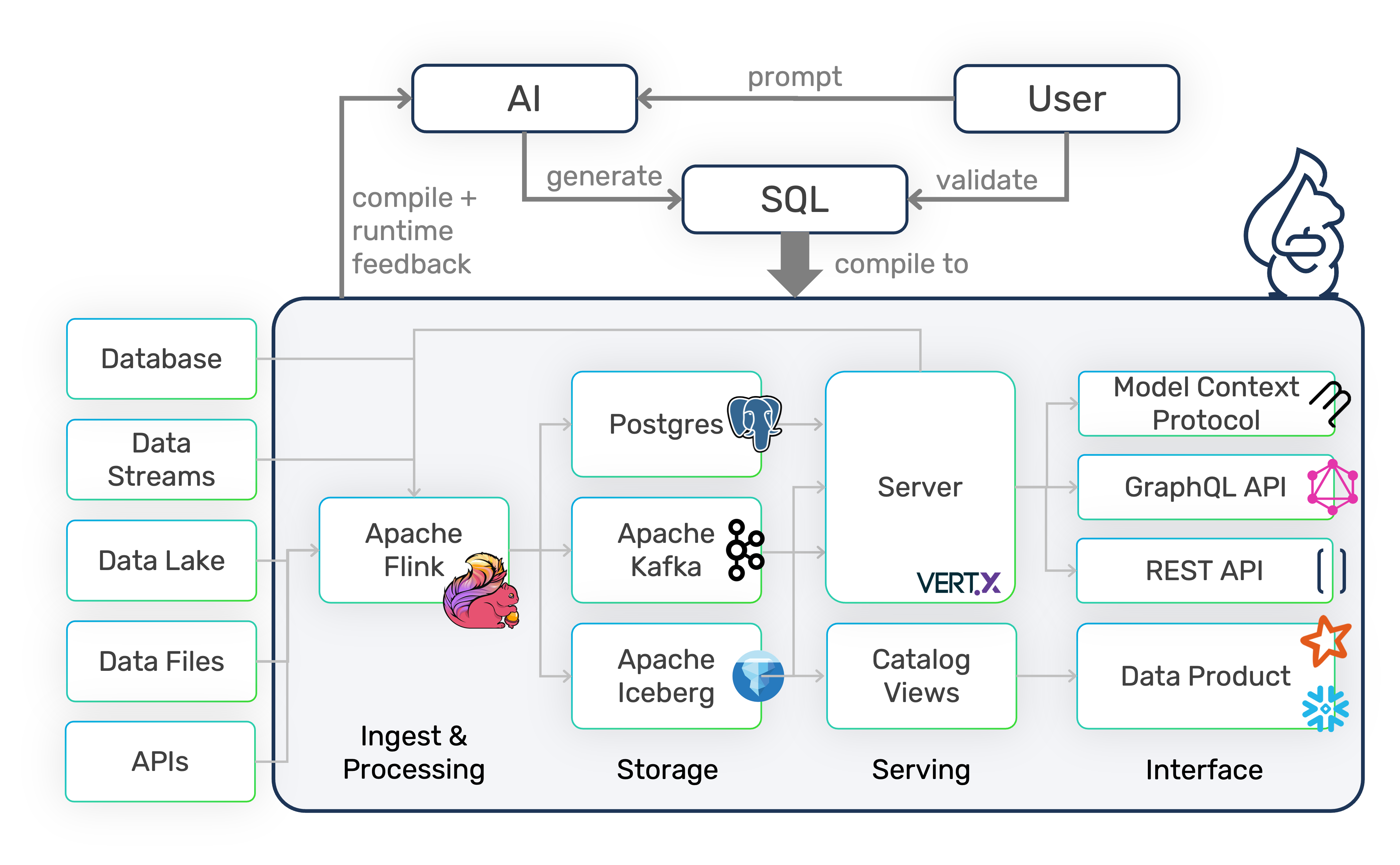
DataSQRL is a data automation framework for building reliable data pipelines, data APIs (REST, MCP, GraphQL), and data products in SQL using open-source technologies.
DataSQRL provides three key elements for AI-assisted data platform automation:
DataSQRL generates the deployment artifacts to execute the entire pipeline on open-source technologies like PostgreSQL, Apache Kafka, Apache Flink, and Apache Iceberg on your existing infrastructure with Docker, Kubernetes, or cloud-managed services.

DataSQRL models data pipelines with the following requirements:
To learn more about DataSQRL, check out the documentation.
To see how DataSQRL provides feedback and guides AI coding agents to build data products autonomously, view this demo video.
To create a new data project with DataSQRL, use the init command in an empty folder.
docker run --rm -v $PWD:/build datasqrl/cmd init api messenger
(Use ${PWD} in Powershell on Windows).
This creates a new data API project called messenger with some sample data sources and a simple data processing script called messenger.sqrl.
Run the project with
docker run -it --rm -p 8888:8888 -p 8081:8081 -v $PWD:/build datasqrl/cmd run messenger-prod-package.json
This launches the entire data pipeline for ingesting, processing, storing, and serving messages. You can access the API in your browser http://localhost:8888/v1/graphiql/ and add messages with the following mutation:
mutation {
Messages(event: {message: "Hello World"}) {
message_time
}
}
Query messages with:
{
Messages {
message
message_time
}
}
Alternatively, you can query messages through REST or MCP.
Once you are done, terminate the pipeline with CTRL-C.
For additional data processing, edit the messenger.sqrl script - for example to aggregate messages:
TotalMessages := SELECT COUNT(*) as num_messages, MAX(m
... [View full README on GitHub](https://github.com/DataSQRL/sqrl#readme)