Voice Mcp Agent
mcp-server-kubernetes · by den-vasyliev
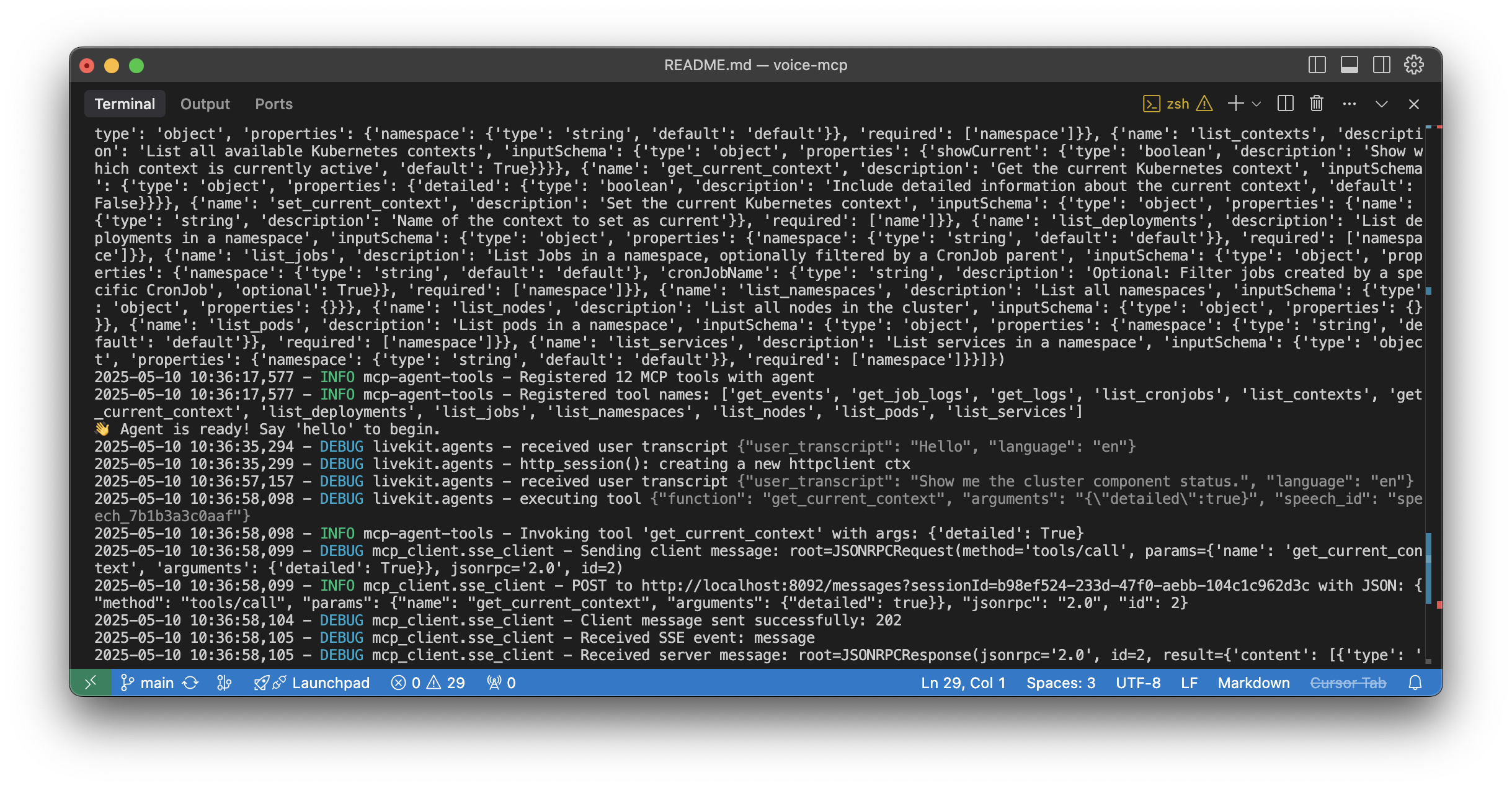
A voice assistant application built with the LiveKit Agents framework, capable of using Model Context Protocol (MCP) tools to interact with external services
No known CVEs
MIT license
Stale
Last commit 239d ago
Works with most clients
Transport: stdio, sse, http
0 tools
Grade F
Step 1
Install in your client
Config is the same across clients — only the file and path differ.
CD
Supported in Claude Desktopstdio, sse, http · Node 18+
Paste into ~/Library/Application Support/Claude/claude_desktop_config.json
{
  "mcpServers": {
    "voice-mcp-agent": {
      "args": [
        "-y",
        "mcp-server-kubernetes"
      ],
      "command": "npx"
    }
  }
}
Are you the author?
Add this badge to your README to show your security score and help users find safe servers.
Embed in your READMEAbout badges →
[](https://mcppedia.org/s/voice-mcp-agent)
Read me
What Voice Mcp Agent does
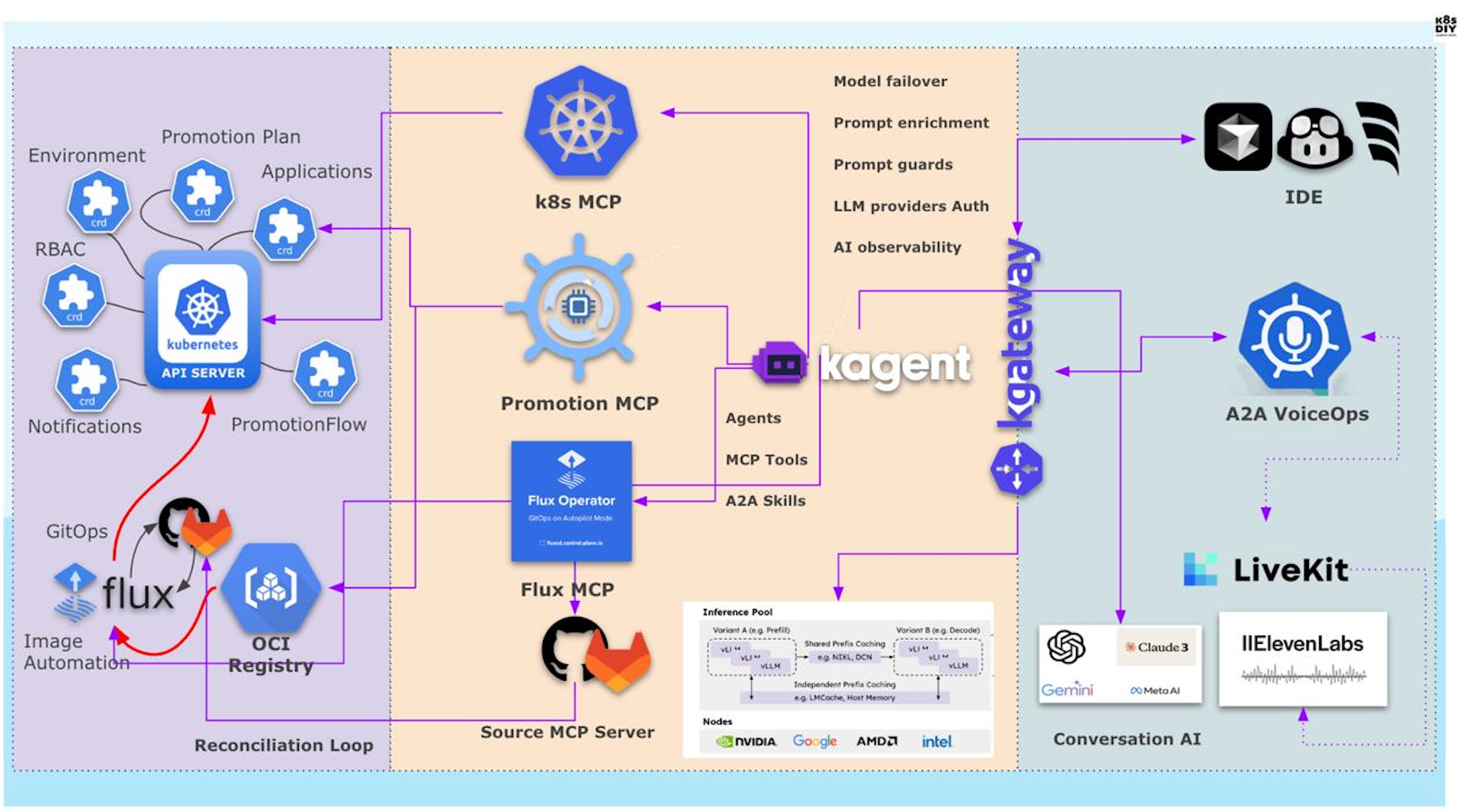
A conversational AI agent and voice assistant application built with the LiveKit Agents framework, capable of using Model Context Protocol (MCP) tools to interact with external services for SRE and Kubernetes operations.
Test This Server
Run this in your terminal to verify the server starts. Then let us know if it worked — your result helps other developers.
npx -y 'mcp-server-kubernetes' 2>&1 | head -1 && echo "✓ Server started successfully"
After testing, let us know if it worked:
Loading README…
Scored, not listed
Why this score
Five weighted categories — click any category to see the underlying evidence.
Score breakdown
55/100across 5 weighted dimensions
0255075100
23
8
14
10
−45
Security
Maintenance
Efficiency
Documentation
Compatibility
Categoriesclick a row to see evidence
Security
OSV.dev5 fixed
CVE-2026-47250low · fixedCVSS 3.1
MCP Server Kubernetes: kubectl-generic flag injection enables Kubernetes bearer token exfiltration
### Summary The `kubectl_generic` tool in `mcp-server-kubernetes` passes user-supplied flags directly to kubectl without any allowlist, enabling a **privilege escalation attack** within Kubernetes environments. An attacker who already has limited cluster or codebase access, for example, a developer with pod-deployment permissions but not cluster-admin credentials, can plant a single structured JSON line in an application's log output. When an operator with a privileged kubeconfig uses the MCP se
CVE-2026-46519low · fixedCVSS 3.1
MCP Server Kubernetes: Tool Access Control Bypass via Presentation-Layer Filtering Without Execution-Layer Enforcement
## Summary `mcp-server-kubernetes` exposes three environment variables (`ALLOW_ONLY_READONLY_TOOLS`, `ALLOW_ONLY_NON_DESTRUCTIVE_TOOLS`, `ALLOWED_TOOLS`) documented as access controls for restricting which Kubernetes operations are available. These controls are enforced at the tool discovery layer (`tools/list`) but not at the execution layer (`tools/call`). Any client that knows a tool name can invoke it directly regardless of the configured restriction mode. The access control was effectively
CVE-2026-39884low · fixedCVSS 3.1
MCP Server Kubernetes has an Argument Injection in port_forward tool via space-splitting
## Summary The `port_forward` tool in `mcp-server-kubernetes` constructs a kubectl command as a string and splits it on spaces before passing to `spawn()`. Unlike all other tools in the codebase which correctly use `execFileSync("kubectl", argsArray)`, `port_forward` uses string concatenation with user-controlled input (`namespace`, `resourceType`, `resourceName`, `localPort`, `targetPort`) followed by naive `.split(" ")` parsing. This allows an attacker to inject arbitrary kubectl flags by emb
CVE-2025-66404low · fixedCVSS 3.1
mcp-server-kubernetes has potential security issue in exec_in_pod tool
### Summary A security issue exists in the `exec_in_pod` tool of the `mcp-server-kubernetes` MCP Server. The tool accepts user-provided commands in both array and string formats. When a string format is provided, it is passed directly to shell interpretation (`sh -c`) without input validation, allowing shell metacharacters to be interpreted. This vulnerability can be exploited through direct command injection or indirect prompt injection attacks, where AI agents may execute commands without expl
CVE-2025-53355low · fixedCVSS 3.1
MCP Server Kubernetes vulnerable to command injection in several tools
### Summary A command injection vulnerability exists in the `mcp-server-kubernetes` MCP Server. The vulnerability is caused by the unsanitized use of input parameters within a call to `child_process.execSync`, enabling an attacker to inject arbitrary system commands. Successful exploitation can lead to remote code execution under the server process's privileges. The server constructs and executes shell commands using unvalidated user input directly within command-line strings. This introduces
Community
Reviews
Be the first to review
Have you used this server?
Share your experience — it helps other developers decide.
How easy was setup?Did it work reliably?How was the documentation?
Sign in to write a review.
Frequently Asked Questions
- Is Voice Mcp Agent safe to use?
- Voice Mcp Agent has no known CVEs as of the latest MCPpedia security scan. It does not require authentication, so any local process can connect — keep this in mind in shared environments. Licensed under MIT.
- How do I install Voice Mcp Agent?
- Voice Mcp Agent supports copy-paste install configs on its MCPpedia page for Claude Desktop, Cursor, and Claude Code. Scroll to the Quick Install section and select your client.
- What AI clients work with Voice Mcp Agent?
- Voice Mcp Agent is compatible with claude-desktop, cursor, claude-code. It uses stdio and sse and http transport.
- Is Voice Mcp Agent actively maintained?
- Voice Mcp Agent is less actively maintained — last commit was 239 days ago. It has 70 GitHub stars.
Related
Similar servers
Others in ai-ml
 Memory MCP Server98
Persistent memory using a knowledge graph
87.1k 5
Sequential Thinking MCP Server98Dynamic problem-solving through sequential thought chains
87.1k 1
 Better Chatbot96
Just a Better Chatbot. Powered by Agent & MCP & Workflows.
1.1k 4
 Antigravity Workspace Template96
Workspace template + MCP server for Claude Code, Codex CLI, Cursor & Windsurf. Multi-agent knowledge engine (ag-refresh / ag-ask) that turns any codebase into a queryable AI assistant.
1.3k 2
MCP Security Weekly
Get CVE alerts and security updates for Voice Mcp Agent and similar servers.
Community
Discussion
Start a conversation
Ask a question, share a tip, or report an issue.
Has anyone used this with Cursor?How do you handle auth?Any alternatives?
Sign in to join the discussion.